
Sell a card
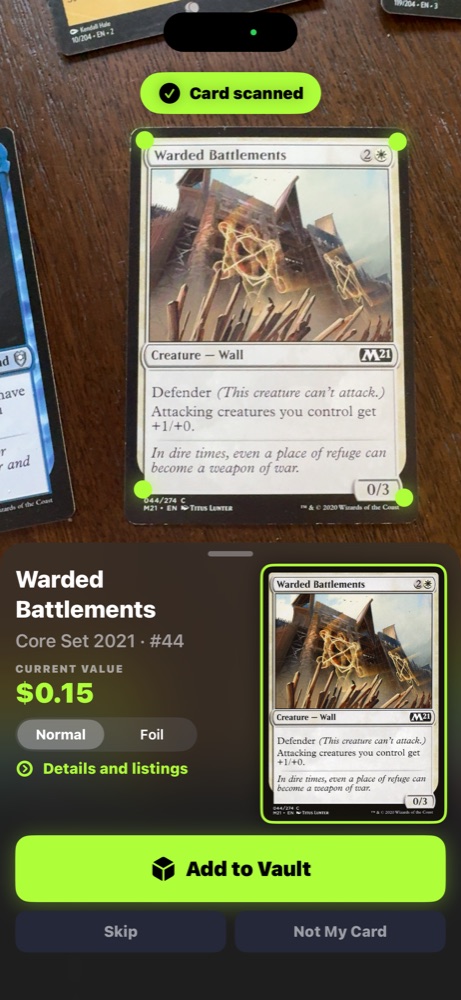
Scan a card to fill in the details. You pick how you ship, plain envelope, top-loaded bubble, or tracked package. Buyers pay through Stripe, and you are paid once the card is delivered.
No listing fees. Free signup.


How selling works
Scan or list
Use the Card Oracle app to scan your card. It identifies the set, number, and parallel automatically. Or list manually from the web in under a minute.
Price with market estimates
Our Price Guide shows a market estimate for each card, refreshed on a schedule. Price at that estimate, under it, or with a Best Offer floor. Recorded sale history fills in once the marketplace starts recording sales.
Ship and add tracking
Ship the card yourself with any carrier, then add the tracking number to the order. Your payout is released when the buyer confirms delivery, or 14 days after shipping.
Fees
One selling fee that covers payment processing. That's the whole pricing page. No tier upsell, no listing fees, no relist fees, no photo enhancement fees.
- 5% of the sale price plus 30 cents per sale. It covers payment processing. No listing fee.
- Shipping is yours to choose and yours to handle, we don't insure shipments
Common seller questions
How much does The Card Oracle charge?
5% plus 30 cents per sale, which covers payment processing. No listing fees, photo fees or relisting fees. If that changes, it changes for new listings and we will say so first.
Do I need an account or a subscription to sell?
An account, yes. A subscription, no. Selling is open to every account, and paid plans are not on sale.
What about graded cards or sealed boxes?
Both can be listed. Pick the graded or sealed category, add your own photos, and describe the grade or seal condition in the listing. There is no automated cert lookup yet, so the details you write are what the buyer sees.
How do I get paid?
Payouts run through Stripe, so you connect a Stripe account once and the money lands there. Your share of a sale is released when the buyer confirms delivery, or 14 days after you add the tracking number. After that, Stripe sets when it reaches your bank.
Can I import my existing inventory?
Not as listings yet. You can scan cards into your Vault with the iOS app, and you can paste decklists on the web, but there is no bulk listing import and no TCGplayer or eBay migration tool.
List a card
Scan or enter a card, set your price, and it goes live in the marketplace. 5% plus 30 cents per sale, which covers payment processing. No listing fee.
List your first card